Can you see Google AI Mode traffic in Search Console?
Summarize with ChatGPTClaudePerplexity
TL;DR
- Google Search Console’s Generative AI performance report shows impressions from Google AI Mode and AI Overviews.[12][5]
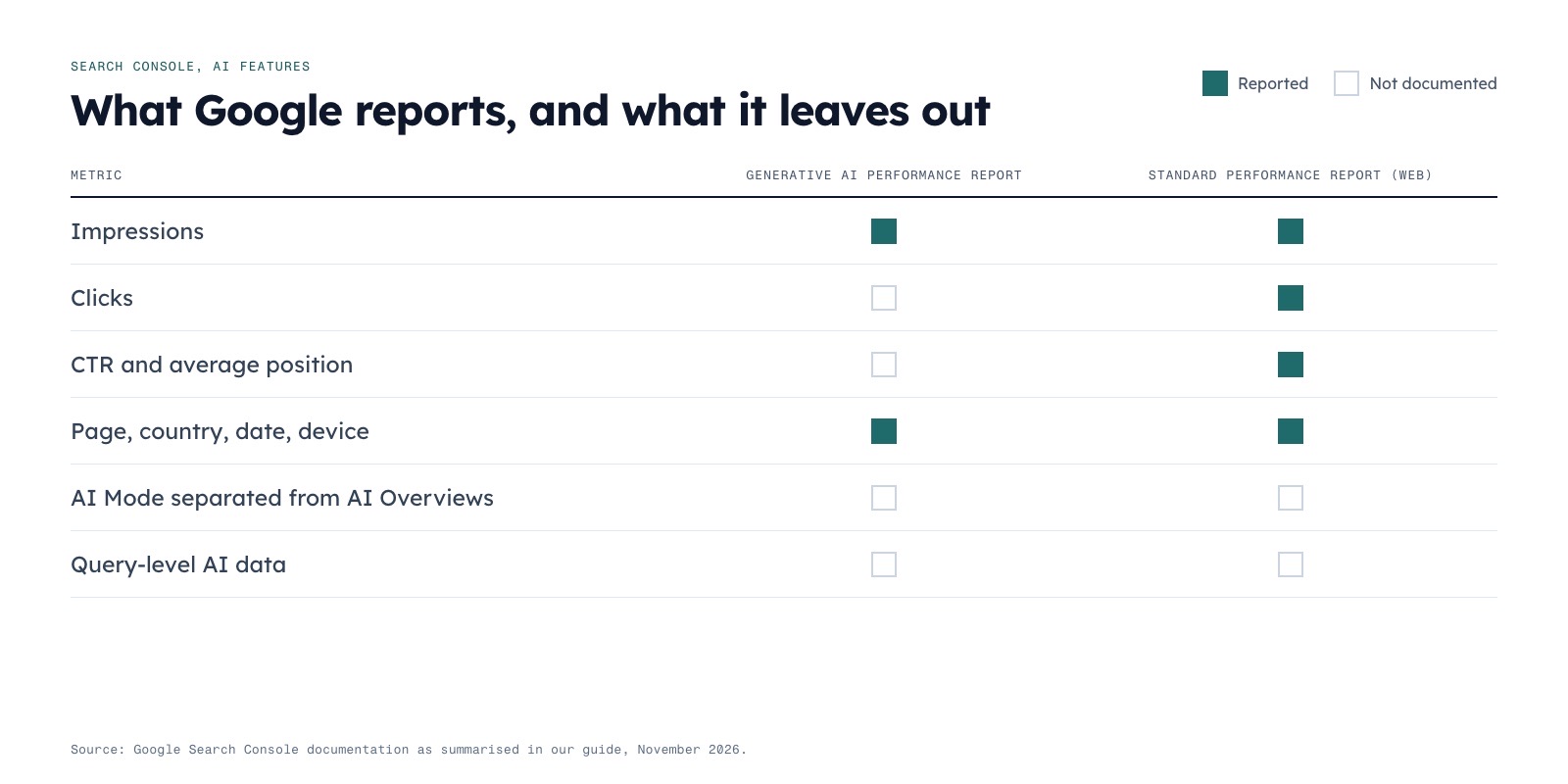
- The dedicated report does not document AI Mode-only clicks, CTR, average position, or query-level data.[7]
- AI Mode and AI Overviews are included in overall `Web` Search Console traffic for standard performance reporting.[5]
- AI Mode follow-up prompts are treated as new searches, so their impressions and clicks are attributed to the follow-up query.[9]
- Use GSC for generative-AI visibility trends and separate analytics or first-party measurement for traffic and conversions.[15]
Google Search Console can now show impressions from Google AI Mode and AI Overviews in its dedicated Generative AI performance report.[1] However, it does not provide a clean AI Mode-only report for clicks, click-through rate, average position, or query-level attribution.[2][3]
That means GSC is useful for measuring generative-AI exposure, but not for answering precisely how many visits came from AI Mode. Google places AI Mode and AI Overviews inside the broader Web search type for standard Search Console reporting, while the dedicated report focuses on impressions.[4][5]
What is Google AI Mode data in Search Console?
Google’s Generative AI performance report measures how often links to a property appeared to users inside supported generative-AI features on Google Search, including AI Overviews and AI Mode.[5] Google announced the report on June 3, 2026, and reported that its worldwide rollout was complete by August 31, 2026.[6]
The report should be understood as a visibility report rather than a conventional traffic report. Its documented breakdowns are page, country, date, and device, with Web: text-based and Web: multimodal search-type options.[5]
Google does not document a separate AI Mode series and AI Overview series inside the report. It also does not list clicks, CTR, or average position as metrics in the dedicated generative-AI view.[7]
Why this distinction matters
An impression means that links to a site were shown to a user in a generative-AI feature; it does not mean that the user visited the site.[5] A site can therefore gain AI visibility without receiving an equivalent number of sessions.
Search Console also aggregates the chart by property. If two results from the same site appear in one generative-AI result, Google counts them as one chart impression; applying a URL filter changes the aggregation to the URL level.[5]
What does GSC report—and what does it not report?
| Search Console view | What is reported | What is not established |
|---|---|---|
| Generative AI performance report | Impressions from supported generative-AI features, including AI Overviews and AI Mode, with page, country, date, and device breakdowns.[5] | A separate AI Mode-versus-AI Overviews series, AI-only clicks, CTR, average position, or documented query-level data.[7] |
| Standard Performance report | Clicks, impressions, CTR, and average position for overall Search traffic, including AI Overviews and AI Mode within the Web search type.[5][8] |
A dedicated AI Mode click total separated from other Web search traffic.[5] |
| AI Mode interactions | Industry reporting says an external link click from an AI Mode response counts as a click, while a follow-up prompt is treated as a new search.[9] | A separate AI Mode click metric in the dedicated Generative AI report.[2][6] |
| AI Overview links | Standard impression rules apply; links revealed after selecting “Show more” can count, and links in an AI Overview share the Overview’s reported position.[10] | The link’s actual rank or prominence within the generated answer.[10][11] |
The practical answer to “Does Search Console show AI Mode data?” is therefore yes for impressions, but not as a complete AI Mode traffic report.
How are AI Mode impressions and clicks attributed?
Google’s dedicated report defines an impression around the appearance of links to a site in a generative-AI feature.[5][12] It does not define the impression as a unique person, a session, or a click.
AI Mode follow-up prompts introduce another attribution complication. Search Engine Land’s account of Google’s guidance says that each follow-up prompt is treated as a new search, with its impressions, clicks, and positions attributed to that new query.[9]
For example, a user might begin with a broad prompt, ask a follow-up question, and then click a link. The resulting interaction is not necessarily attributed to the original prompt; the follow-up is treated as a separate search.[9]
AI Overview position data has a different limitation. Links in the same AI Overview can receive the Overview’s reported position rather than a position representing their order inside the generated response.[3][10] Consequently, average position should not be interpreted as the link’s rank within the AI-generated answer.[3][10]
The dedicated generative-AI report does not list average position as one of its documented metrics in the first place.[2][7]
Can you separate AI Mode from AI Overviews?
Not reliably inside the documented dedicated report. Google lists both AI Mode and AI Overviews as supported generative-AI features, but the report documentation does not describe separate feature-level series for the two surfaces.[5]
The report’s Web: text-based and Web: multimodal filters are search-type options, not documented controls for selecting AI Mode or AI Overviews individually.[5] A report showing generative-AI impressions should therefore not be labelled “AI Mode impressions only” unless Google provides a more specific dimension.
The same limitation applies to query reporting. The cited documentation lists page, country, date, and device breakdowns, but does not document a query dimension for the dedicated generative-AI report.[5][1]
For reporting purposes, use precise labels such as:
- “Generative-AI impressions”
- “AI search visibility”
- “Search Console impressions from supported AI features”
Avoid labelling the number “AI Mode clicks” unless the data source explicitly identifies those clicks.
What are the main Search Console limitations?
Several limitations affect how teams should interpret the report.
- Impressions are not visits. The report measures displayed links, not unique users or sessions.[13][11]
- The dedicated report is impression-focused. Its documentation does not list AI-specific clicks, CTR, or average position.[2]
- AI Mode and AI Overviews are not documented as separate series. Both features are named, but the report does not specify a feature split.[8][5]
- Query-level data is not documented. The listed dimensions are page, country, date, and device.[5]
- Property aggregation can hide multiple appearances. Two results from one site in the same generative-AI result count as one chart impression.[5]
- Search Labs experiment data is excluded. The report also carries the possibility of preliminary data that may change.[5]
- Standard Search Console limits still apply. These include the usual 1,000-row limit and relevant time-period restrictions, while chart and table totals can sometimes differ.[5]
- Fan-out searches are not separately documented. A user’s underlying AI Mode research path should not be assumed to appear as a distinct report dimension.
The report includes an export option for chart and table data, which makes it practical for period-over-period visibility analysis.[5]
How should you measure AI Mode performance?
The most defensible approach is to treat Search Console as one part of a measurement system. Use the dedicated report to monitor exposure, the standard Performance report to monitor blended Search outcomes, and analytics tools to study downstream sessions and conversions.
Workaround: build a practical AI Mode measurement process
- Record Generative AI impressions as visibility data. Review the report by page, country, device, and date, then export the chart or table when comparing periods.[5]
- Create a separate baseline from the standard Performance report. Track blended
Webclicks, impressions, CTR, and position, while clearly noting that these totals include more than AI Mode and AI Overviews.[5][9] - Compare trends, not attributed totals. If generative-AI impressions rise while blended clicks change, describe the relationship as a correlation rather than claiming that AI Mode caused the change.[9][14]
- Annotate reporting gaps. State explicitly that AI-specific CTR, AI-only clicks, feature-level separation, and dedicated query data are not published in the cited report documentation.[4]
- Use first-party analytics for landing-page outcomes. Examine sessions, engagement, leads, and revenue separately from Search Console impressions; do not convert impressions into visits without an independently measured click path. Finseo’s own research roundup finds that analytics records about 1 in 10 AI-driven conversions and describes a post-purchase survey that closes the gap.
- Validate important prompts manually. Check representative AI Mode searches and record whether the brand appears, which page is cited, and whether the cited link is clickable. Manual checks provide examples, not statistically complete measurement.
- Do not use GA4’s default
AI Assistantchannel as an AI Mode filter. Google’s channel definition includes services such as ChatGPT, Gemini, DeepSeek, Copilot, and Grok, but excludes Google AI Overviews and AI Mode.[5]
What should a monthly AI search report say?
A defensible report can state: “Generative-AI impressions increased or decreased during the period, based on Search Console’s dedicated report. Search Console does not document a separate AI Mode click, CTR, position, or query-level series, so AI-attributed visits and conversions are reported separately or marked unavailable.”[15]
Why impressions and clicks should be analysed separately
Independent behavioural research reinforces the distinction between visibility and traffic, although it does not provide a conversion formula for an individual website.
A 2026 study analysed one month of browsing data from a representative panel of 900 U.S. adults, with observations collected from March 1 through March 31, 2025.[14] It found that users clicked a search-result link in 15% of visits to Google results pages without an AI Overview, compared with 8% of visits to pages that produced an AI Overview.[11]
Clicks on sources cited inside AI Overviews occurred in about 1% of AI Overview visits.[13][14] The researchers describe the results as associations rather than proof that AI Overviews caused the observed behaviour, and the study measures panel browsing rather than Search Console attribution for a specific property.[13][14]
The finding is useful context: a page can appear in an AI result, receive an impression, and still produce no measurable visit. It is therefore safer to report AI visibility and AI traffic as separate outcomes.
What should marketers call the data?
Use terminology that matches what the source actually measures.
Good labels include:
- Generative-AI impressions
- AI search impressions
- AI feature visibility
- Search Console AI visibility
- Blended Web clicks, including AI features
Labels to avoid unless independently verified include:
- AI Mode visits
- AI Mode conversions
- AI Mode CTR from the dedicated report
- AI Mode-only average position
- Number of people reached in AI Mode
This language is more than editorial precision. It prevents teams from treating a property-level impression count as a person-level audience measure or a blended Web click total as a confirmed AI Mode traffic total.[5]
Frequently asked questions
Does Google Search Console show AI Mode data?
Yes. Search Console’s Generative AI performance report includes impressions from Google AI Mode and AI Overviews.[1] The report does not provide a documented AI Mode-only total for clicks, CTR, average position, or queries.[7]
Does GSC show clicks from Google AI Mode?
Google includes AI Mode within overall `Web` search traffic, where standard clicks are reported.[5][8] However, the dedicated Generative AI report is documented as an impressions report, so it does not provide a separate AI Mode click total.[1]
Can Search Console separate AI Mode from AI Overviews?
The cited documentation does not document a separate AI Mode-versus-AI Overviews series.[3] It names both features and provides page, country, date, and device breakdowns, but the listed dimensions do not establish a feature-level split.[5]
Does Search Console show which queries triggered AI Mode impressions?
The dedicated report documentation lists page, country, date, and device breakdowns, not a query dimension.[5] Query-level AI Mode attribution should therefore be treated as unavailable in that report unless Google adds or documents the dimension.
How are follow-up questions counted in AI Mode?
Google’s reported guidance treats each AI Mode follow-up prompt as a new search.[9] Its impressions, clicks, and position are attributed to the new query rather than simply being added to the original prompt.[9]
Can GA4 identify Google AI Mode traffic?
GA4’s default `AI Assistant` channel is not a reliable Google AI Mode workaround because Google’s definition explicitly excludes AI Overviews and AI Mode.[2][3] Analytics may still show downstream sessions through other classifications or referral details, but the default channel should not be presented as an AI Mode-only source.
Sources
- 1Google Search Console AI Reports Rolled Out Worldwide — searchenginejournal.com
- 2What are impressions, position, and clicks? - Search Console Help — support.google.com
- 3Search Console gives every AI Overview link the same position. That is not a rank. | Mintec Blog — mintec.co
- 4GSC's new AI Overview reporting - How can we use this information? - Marie Haynes — mariehaynes.com
- 5Generative AI performance report (Search) - Search Console Help — support.google.com
- 6Introducing Search Generative AI performance reports in Search Console | Google Search Central Blog | Google for Developers — developers.google.com
- 7Performance report (Search results): Overview and basic setup - Search Console Help — support.google.com
- 8Is there any way to identify traffic coming from ai mode or ai overview? - Google Search Central Community — support.google.com
- 9Google AI Mode traffic data comes to Search Console — searchengineland.com
- 10Google clarifies how AI Overview impressions get counted — searchenginewatch.com
- 11Investigating Click Behaviors On Google Search Result Pages That Produce an AI Overview — arxiv.org
- 12Google's Mueller Explains How AI Search Impressions Get Counted — searchenginejournal.com
- 13[2608.04831] Investigating Click Behaviors On Google Search Result Pages That Produce an AI Overview — arxiv.org
- 14Investigating Click Behaviors On Google Search Result Pages That Produce an AI Overview — arxiv.org
- 15AI Features and Your Website | Google Search Central | Documentation | Google for Developers — developers.google.com